Parallel Computation in NRV
Overview
NRV is designed to support parallel computing without requiring users to modify their simulation code. For simulations involving independent axon fibers (i.e., where ephaptic coupling is neglected), the problem is embarrassingly parallel: each fiber can be simulated on a separate core with no need for inter-core communication.
However, not all steps in the simulation pipeline are trivially parallelizable:
FEM computations are more complex and are treated separately.
Post-processing involves gathering data from all fibers, requiring basic synchronization.
Axon population generation and packing use custom algorithms that are not yet parallelized.
NRV handles these complexities internally, allowing users to scale simulations from a few axons to full nerves without needing deep knowledge of parallel programming.
Parallelization Scope
The figure below shows which parts of the NRV workflow are currently parallelized:
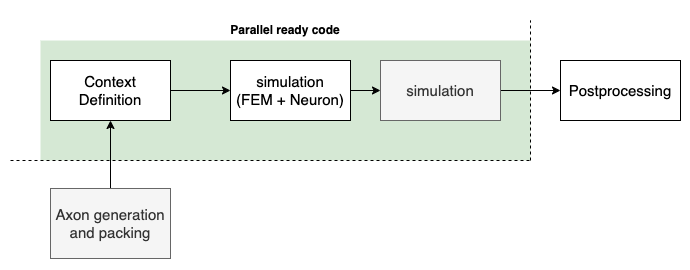
Notes on Current Capabilities:
Axon generation and packing are currently single-threaded.
Post-processing is either single-threaded or decoupled from main computations for large-scale runs.
Simulation of axon fibers is fully parallelized and core-dispatching is handled automatically.
Transition from MPI to Python Standard API
Prior to version 1.2, NRV used MPI for multi-core execution. From version 1.2 onward, NRV leverages Python’s standard multiprocessing API. This simplifies setup and ensures compatibility across platforms—from laptops to HPC clusters—without requiring specialized installations.
Significant optimizations have been implemented to keep axon population generation fast and efficient, even for simulations involving 1,000+ axons. CPU resource allocation is handled seamlessly, although users can override defaults via the NRV.ini configuration file or directly in Python scripts.
Controlling Parallel Execution
Parallelism in NRV is mostly automatic, but users can optionally specify the number of CPUs used for each phase of a simulation. CPU usage for each phase of the simulation can be controlled in nrv/_misc/NRV.ini:
Key |
Description |
|---|---|
FASCICLE_CPU |
Number of CPUs used for NEURON simulations |
COMSOL_CPU |
Number of CPUs used for COMSOL (must align with license) |
GMSH_CPU |
Number of CPUs for meshing (≤4 recommended) |
FENICS_CPU |
Number of CPUs for FEM via FEniCSx (1 recommended currently) |
These keys control how NRV interacts with third-party libraries, independent of simulation-level parallelism. NRV automatically manages this behind the scenes.
Number of CPU cores for each step can be dynamically adjusted with the following built-in functions: set_nmod_ncore(), set_gmsh_ncore(),
set_optim_ncore().
Example: Parallel Nerve Simulation
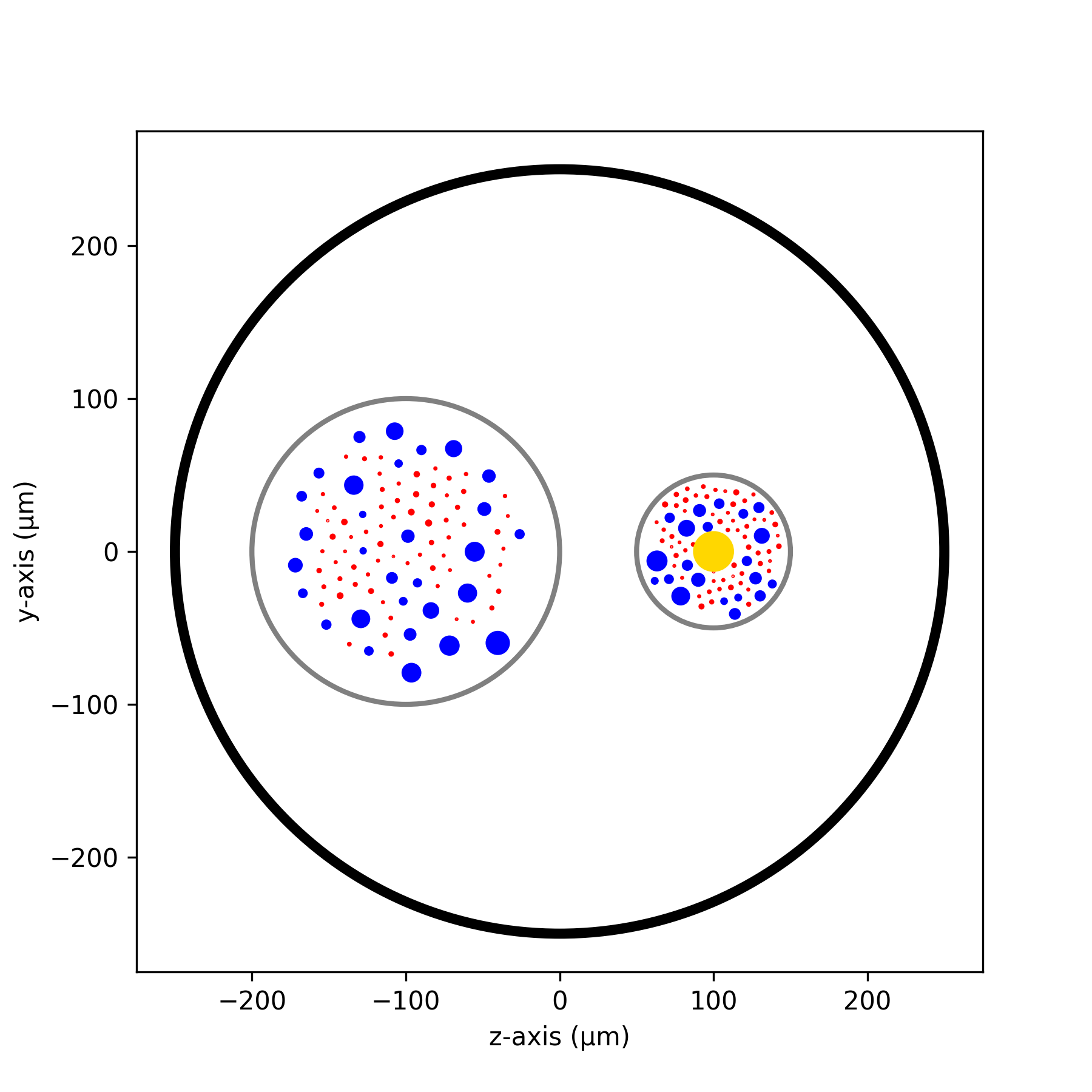
Below is a practical example illustrating how a nerve simulation can be distributed across multiple cores.
Step 1: Define Nerve Geometry
import nrv
import matplotlib.pyplot as plt

def create_nerve():
    outer_d = 5      # mm
    nerve_d = 500    # µm
    nerve_l = 5000   # µm
    fasc1_d, fasc1_y, fasc1_z = 200, -100, 0
    fasc2_d, fasc2_y, fasc2_z = 100, 100, 0
    t_start, t_pulse, amp_pulse = 0.1, 0.1, 60

    nerve = nrv.nerve(length=nerve_l, diameter=nerve_d, Outer_D=outer_d)
    fascicle_1 = nrv.fascicle(diameter=fasc1_d, ID=1)
    fascicle_2 = nrv.fascicle(diameter=fasc2_d, ID=2)
    nerve.add_fascicle(fascicle_1, y=fasc1_y, z=fasc1_z)
    nerve.add_fascicle(fascicle_2, y=fasc2_y, z=fasc2_z)

    for fasc in [fascicle_1, fascicle_2]:
        diam, types, _, _ = nrv.create_axon_population(
            n_ax=100, percent_unmyel=0.7, M_stat="Ochoa_M", U_stat="Ochoa_U"
        )
        fasc.fill_with_population(diam, types, delta=5)
        fasc.fit_population_to_size(delta=2)

    stim = nrv.FEM_stimulation("endoneurium_ranck", "perineurium", "epineurium", "saline")
    life = nrv.LIFE_electrode("LIFE_2", 25, 1000, (nerve_l - 1000)/2, fasc2_y, fasc2_z)
    pulse = nrv.stimulus()
    pulse.pulse(t_start, -amp_pulse, t_pulse)
    stim.add_electrode(life, pulse)
    nerve.attach_extracellular_stimulation(stim)

    fig, ax = plt.subplots(figsize=(6, 6))
    nerve.plot(ax)
    ax.set_xlabel("z-axis (µm)")
    ax.set_ylabel("y-axis (µm)")
    fig.savefig("nerve_example.png", dpi=300)
    plt.close(fig)

    return nerve
Step 2: Simulate the Nerve
def simulate_nerve(nerve, nproc=12):
    nrv.parameters.set_nmod_ncore(nproc)
    return nerve(t_sim=3, postproc_script="is_recruited")
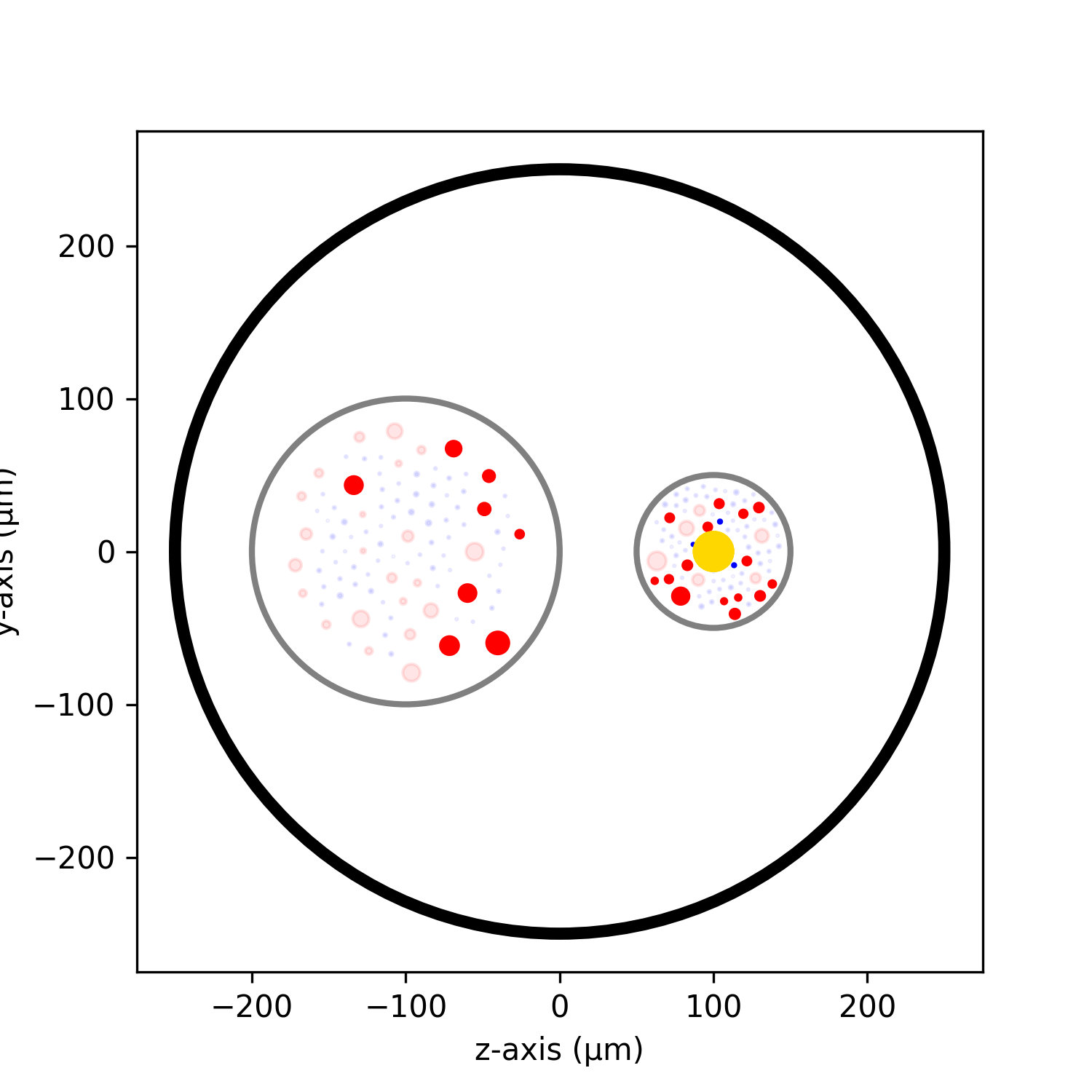
Step 3: Post-process Results
def postprocessing(results):
    fig, ax = plt.subplots(figsize=(5, 5))
    results.plot_recruited_fibers(ax)
    ax.set_xlabel("z-axis (µm)")
    ax.set_ylabel("y-axis (µm)")
    fig.savefig("nerve_postproc.png", dpi=300)
    plt.close(fig)
Main Execution Script
if __name__ == "__main__":
    sim_nerve = create_nerve()
    results = simulate_nerve(sim_nerve, nproc=12)
    postprocessing(results)
Note
Only the simulation phase is parallelized. Pre- and post-processing remain single-threaded for simplicity and stability.
Note
If the number of specified CPUs exceeds those available, threads will share CPU cores. The simulation will still complete correctly, though potentially less efficiently.
Tip
Wrap your code in if __name__ == "__main__": to ensure proper multiprocessing behaviour.
Warning
Avoid running massively parallel simulations in Jupyter Notebooks. Use standalone scripts for heavy computations. Design and post-processing, however, work well in notebooks.
Why multiprocessing instead of multithreading?
NRV currently uses Python’s multiprocessing module rather than multithreading due to the limitations imposed by the Global Interpreter Lock (GIL). The GIL ensures that only one thread executes Python bytecode at a time, which severely restricts the performance gains from multithreading in CPU-bound tasks—such as axon simulations and numerical computations—where actual parallel execution is needed.
Multiprocessing circumvents the GIL by creating separate Python processes with their own memory space, enabling true parallel computation across cores. This is why NRV leverages multiprocessing to perform efficient large-scale simulations today.
However, future versions of Python (starting from 3.12+) and emerging projects like nogil Python, subinterpreters, and improved C-extension support are gradually offering ways to safely bypass or eliminate the GIL. As these solutions stabilize and gain support from third-party libraries (e.g., NumPy, NEURON, FEniCS), NRV plans to transition toward multithreading.
Using multithreading instead of multiprocessing offers several advantages:
Lower memory usage: Threads share memory space, whereas processes do not.
Faster context switching: Threads switch more efficiently than processes.
Simplified data sharing: No need for inter-process communication or serialization.
Better scalability: Especially useful on machines with many logical cores (e.g., via hyperthreading).
This evolution will allow NRV to scale more efficiently while reducing the overhead of process management and data duplication across simulations.
What About GPUs?
Currently, NRV does not utilize GPUs:
NEURON has limited GPU support, focused on interconnected networks—unsuitable for independent axons.
FEniCSx GPU support is still experimental and under development.
Future versions of NRV may explore GPU-accelerated libraries like CuPy or PyTorch for array-based operations.
We are actively investigating these possibilities and welcome contributions or suggestions from the community.